A Practical Review of the 10 Project Management Line Icons Bundle
When building a presentation, designing a user interface, or creating a report, the visual language you choose significantly impacts clarity and professionalism. For professionals in project management, consulting, or corporate training, finding iconography that is both relevant and high-quality can be a time-consuming process. The 10 Project Management Line Icons Bundle is a specific collection designed to address this need, offering a curated set of graphics that cover core project management concepts. This article explores what this bundle offers, how it compares to broader alternatives, and whether it aligns with your specific workflow requirements.
Understanding the Bundle's Core Components
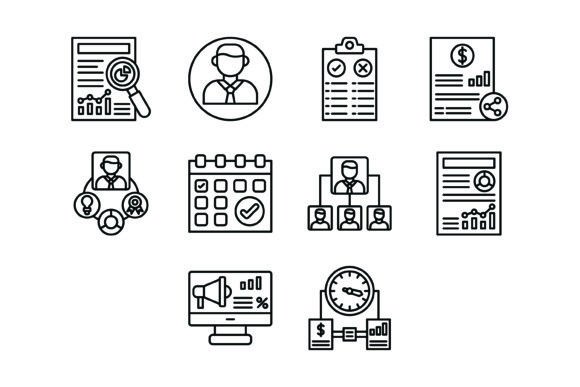
At its heart, this bundle is a focused toolkit rather than a massive, sprawling library. It includes ten distinct icons, each representing a fundamental aspect of project work:
- Research Icon - Symbolizes the investigation and discovery phase.
- Manager Icon - Represents leadership and oversight roles.
- Pros and Cons Icon - Illustrates decision-making and analysis.
- Share Icon - Denotes collaboration and communication.
- Skills Icon - Highlights competency and team abilities.
- Calendar Icon - Points to scheduling and deadlines.
- Organization Structure Icon - Depicts hierarchy and team organization.
- Report Icon - Stands for documentation and data presentation.
- Marketing Icon - Covers promotional and outreach activities.
- Time Management Icon - Focuses on efficiency and task prioritization.
The selection is pragmatic. It covers planning, execution, collaboration, and review—key stages in any project lifecycle. The "line" style is minimalist, which tends to integrate well into modern digital interfaces and clean document layouts without overwhelming the content.
File Formats and Technical Flexibility
A critical factor in evaluating any graphic asset is its technical adaptability. The 10 Project Management Line Icons Bundle is delivered in a zip file containing five formats: AI, EPS, JPG, PNG, and SVG. This range is significant.
- AI and EPS are vector formats. They are essential for designers who need to edit the icons in Adobe Illustrator or similar software. You can change colors, stroke weights, or combine elements without any loss of quality.
- SVG (Scalable Vector Graphics) is the web standard. It ensures icons look crisp on any screen resolution, from mobile phones to 4K monitors, and is easily styled with CSS.
- PNG files with a transparent background are the workhorse for quick use in presentations (like PowerPoint or Google Slides), documents, and basic web layouts where editing the vector source isn't necessary.
- JPG is a universal raster format, useful for contexts where transparency isn't needed and file size is a consideration, though it lacks the scalability of vectors.
This multi-format approach means the bundle is not locked into a single workflow. A marketing team might use the PNGs for a slide deck, while a developer could implement the SVGs directly into a web application's interface. The 10 Project Management Line Icons Bundle is designed to be a starting point that adapts to the user's environment, not the other way around.
Comparing with Broader Icon Libraries and Alternatives
When choosing iconography, you generally face a choice between curated bundles like this one and massive, generic icon libraries (e.g., Font Awesome, Material Icons, or large stock sets). The trade-offs are clear.
Curated bundles, such as the 10 Project Management Line Icons Bundle, offer thematic cohesion. The icons are designed to work together visually and conceptually. They save you the labor of searching through thousands of unrelated icons to find ten that match in style and subject. For a specific project on project management methodologies, this can be more efficient than using a generic set.
Large libraries, on the other hand, provide breadth. If your needs extend beyond core project management—into areas like finance, human resources, or technical IT—a massive library might offer more one-stop convenience. However, consistency can suffer if you mix icons from different sets or styles.
There is also a middle ground: modular icon systems. These are often larger than a ten-icon bundle but smaller than a full library, organized by category (e.g., "Business," "Communication," "Analytics"). They can offer a balance between focus and variety. The 10 Project Management Line Icons Bundle sits at the focused end of this spectrum, which is its primary strength and its main limitation.
Evaluating Strengths and Practical Limitations
The strengths of this particular bundle are rooted in its specificity and technical preparation.
- Ready-to-Use Design: The icons are pre-designed for immediate implementation, which can accelerate project timelines for non-designers or teams without dedicated graphic resources.
- Vector Scalability: The inclusion of AI, EPS, and SVG files means the icons can be scaled to any size—from a favicon to a billboard—without pixelation. This is a non-negotiable feature for professional applications.
- Consistent Style: The line-art aesthetic is modern and versatile, suitable for both corporate and creative contexts. It avoids the dated look of overly detailed or cartoonish icons.
However, there are tradeoffs to consider.
- Limited Scope: With only ten icons, it cannot cover the entire breadth of project management terminology. You may find gaps if your project involves highly specialized processes (e.g., agile sprints, risk matrices, or specific software integrations).
- Style Lock-in: If the bundle's line weight, corner radius, or overall aesthetic doesn't match your existing brand or design system, integrating it may require additional editing time.
- No Customization Service: As a standard digital product, it typically does not include bespoke modification. You receive the files as-is.
Determining the Right Fit for Your Needs
The 10 Project Management Line Icons Bundle is likely a good fit if your situation aligns with these scenarios:
- You are creating a dedicated presentation or report on project management and need clean, thematic visuals to enhance key points.
- You are designing the user interface for a simple project management tool or dashboard and require a small, consistent set of icons for navigation and status indicators.
- You work in education or training and need to illustrate concepts in course materials or manuals.
- Your design budget is limited, and you prefer a one-time purchase over a subscription model for icon assets.
Conversely, you may need to look for a different solution if:
- Your project requires extensive or niche iconography beyond core management concepts.
- Your brand guidelines demand a very specific icon style (e.g., filled, isometric, 3D) that this line-art set cannot provide without significant rework.
- You operate in an environment that relies on a pre-existing, integrated icon library as part of a larger software suite or design system.
In practice, many professionals use a combination. They might employ a focused bundle like this for high-visibility, thematic content while relying on a larger library for general-purpose icons elsewhere. The decision hinges on evaluating the balance between thematic relevance and comprehensive coverage.
Making an Informed Choice
Selecting visual assets is a practical decision that impacts both workflow efficiency and final output quality. The 10 Project Management Line Icons Bundle offers a streamlined, technically sound solution for a specific niche. Its value is highest when its thematic focus matches your project's needs precisely, and when its minimalist line style aligns with your aesthetic goals.
Before deciding, consider auditing your upcoming projects. List the specific concepts you need to visualize. If those concepts map closely onto the ten icons provided—and if the multi-format file package suits your technical environment—then this bundle represents a logical, efficient choice. If your needs are broader or more uncertain, exploring larger, categorized icon systems may offer more long-term flexibility. Ultimately, the best resource is the one that solves your immediate problem without creating new ones in your design and development process.