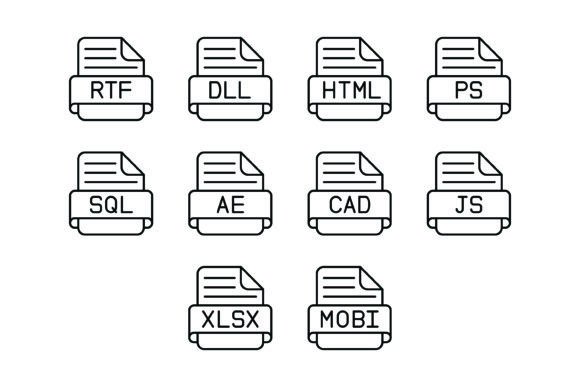
A Practical Look at the 10 File Format Outline Icons Bundle for UI and Documentation
In the landscape of digital design and development, clarity in communication is paramount. One specific area often overlooked until the final stages of a project is the visual representation of file types. Whether you are designing a cloud storage interface, creating technical documentation, or building a file upload component, the icons used to denote formats like HTML, SQL, or XLSX significantly impact user experience. The 10 File Format Outline Icons Bundle enters this space as a specialized resource, offering a curated set of vector graphics designed to solve this specific problem.
Understanding the Bundle's Composition and Format
The core value proposition of this bundle lies in its specific focus. Unlike general-purpose icon packs that might offer thousands of generic symbols, the 10 File Format Outline Icons Bundle targets ten distinct technical formats: RTF, DLL, HTML, PS, SQL, AE, CAD, JS, XLSX, and MOBI. This selection suggests a focus on web development, data management, and creative software workflows.
A critical feature of this offering is the delivery method. The bundle is provided in a Zip file containing five different formats: AI, EPS, JPG, PNG, and SVG. This multi-format approach is a significant advantage for professionals working across different environments. The inclusion of AI and EPS files makes it suitable for those using Adobe Illustrator or vector-based editing software, allowing for deep customization of stroke weights and colors. Conversely, the availability of PNG files with transparent backgrounds caters to quick implementation in web design or presentation slides where immediate usability is prioritized over editability.
Evaluating the Design Philosophy: Outline vs. Solid Styles
The defining characteristic of this bundle is its "outline" style. In modern UI design, outline icons (often called line icons) are frequently chosen for their lightweight aesthetic and ability to convey information without overwhelming the visual hierarchy. Compared to solid or glyph-style icons, outlines tend to feel more modern and airy.
However, this design choice involves tradeoffs. Outline icons generally rely on consistent stroke weights to maintain legibility. While the 10 File Format Outline Icons Bundle claims to be designed for maximum usability, users must consider their specific background. If these icons are placed on a busy or high-contrast background, the thin lines of an outline style can sometimes disappear or become difficult to read, whereas a solid icon might stand up better to visual noise. Conversely, on clean, minimalist interfaces—common in modern SaaS dashboards—outline icons often integrate more seamlessly than their solid counterparts.
Comparing Vector Scalability and Technical Specifications
When evaluating icon resources, scalability is a primary decision factor. The inclusion of SVG (Scalable Vector Graphics) in this bundle is its strongest technical asset. SVGs are resolution-independent, meaning they can be scaled to any size—from a small favicon to a large poster print—without losing sharpness or becoming pixelated. This makes the bundle a robust choice for responsive web design, where assets must look crisp on both small mobile screens and high-resolution desktop monitors.
Compared to raster-only icon packs (which might only offer PNG or JPG), this bundle offers greater longevity. A raster icon set might be cheaper or free, but it often lacks the flexibility required for professional scaling. By offering vector formats alongside raster ones, the 10 File Format Outline Icons Bundle positions itself as a resource for serious production work rather than just quick mockups.
Practical Use Cases: Where This Bundle Fits Best
Determining the "right" icon set depends heavily on the context of the project. The 10 File Format Outline Icons Bundle is likely an excellent fit for specific scenarios:
- File Management Interfaces: For developers building custom file explorers or uploaders, having distinct icons for JS, SQL, and HTML helps users instantly identify content types.
- Educational and Technical Content: If you are creating a tutorial about web development or database management, these icons can visually break up text and highlight specific file types being discussed.
- Presentation Design: The inclusion of JPG and transparent PNGs makes it easy to drag and drop these icons into PowerPoint or Keynote decks to represent data sources or technical assets.
However, there are situations where this bundle might not be the optimal choice. If a project requires a massive library of icons for every conceivable action (e.g., social media, navigation arrows, weather symbols), a dedicated file-format pack would be insufficient. In that case, a comprehensive UI kit would be necessary. Furthermore, if a design system strictly mandates a "filled" or "glyph" aesthetic, the outline nature of these icons would create a visual inconsistency.
Decision Factors: Editability and Licensing
For many designers, the ability to modify assets is just as important as the assets themselves. The bundle's inclusion of AI and EPS files suggests that the vectors are fully editable. This is crucial for branding; a user might need to change the color of the "XLSX" icon to match their company’s specific green or adjust the stroke width to match other native elements in their app.
When comparing this to static icon fonts, the bundle offers more flexibility. While icon fonts are easy to implement via CSS, they can sometimes be difficult to customize individually without affecting the whole set. Separate vector files allow for granular control over each icon.
Conclusion: Balancing Specificity with Utility
The 10 File Format Outline Icons Bundle is not trying to be an all-in-one solution for every design need. Instead, it is a targeted tool. Its distinct value lies in the specificity of the file types it covers—ranging from creative formats like AE (After Effects) and PS (Photoshop) to data formats like SQL and XLSX.
For the adult professional—whether a web developer, UI designer, or technical writer—evaluating this bundle comes down to a question of fit. If your workflow involves representing these specific file types and you value the clean aesthetic of line art combined with the technical reliability of SVG vectors, this bundle serves that purpose effectively. It provides a balance of aesthetic quality and technical utility, ensuring that file type indicators are not just functional, but also visually cohesive within a modern digital environment.