10 Business Flat Icons Bundle: Streamlining Your Visual Communication
The Universal Language of Business Design
In the modern digital landscape, visual communication is not just a luxury; it is a necessity. Whether you are developing a mobile application, designing a corporate website, or preparing a high-stakes presentation, the clarity of your message often depends on the icons you choose. The 10 Business Flat Icons Bundle serves as a comprehensive solution for professionals who need to convey complex business concepts instantly. This collection is not merely a set of pictures; it is a toolkit designed to bridge the gap between abstract ideas and user understanding.
The challenge many designers, developers, and business owners face is consistency. Often, one has to scavenge for icons from various sources, resulting in a disjointed user interface where line weights vary, colors clash, and styles conflict. The 10 Business Flat Icons Bundle addresses this by providing a unified visual language. It ensures that every element, from financial reporting to time management, speaks the same dialect. This bundle is specifically curated to cover the essential pillars of corporate operations, offering a cohesive aesthetic that enhances professionalism.
Core Components: The 10 Essential Business Symbols
Understanding the specific utility of the icons included in the 10 Business Flat Icons Bundle is key to implementing them effectively. The bundle covers a wide range of corporate functionalities, ensuring that you have the right visual metaphor for almost any business scenario.
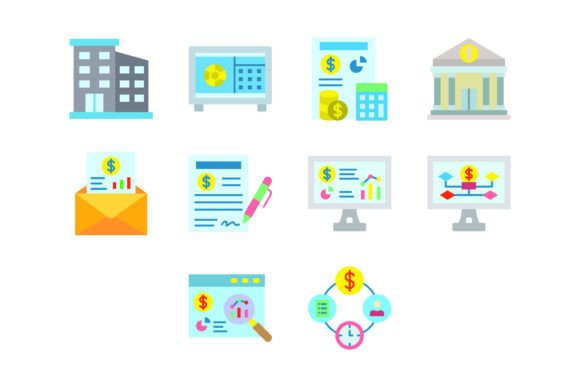
The collection includes:
- Office Icon: Represents the physical workspace or general corporate environment.
- Safebox Icon: Symbolizes security, data protection, and asset management.
- Budget Icon: Essential for financial planning, accounting, and expense tracking.
- Bank Icon: Denotes banking services, transactions, and institutional finance.
- Mail Icon: The universal symbol for communication, newsletters, and contact.
- Agreement Icon: Used for contracts, terms of service, and partnerships.
- Analytic Icon: Visualizes data analysis, metrics, and performance tracking.
- Strategic Plan Icon: Represents goal setting, roadmaps, and future vision.
- Research Icon: Denotes investigation, market research, and discovery.
- Time Management Icon: Essential for scheduling, deadlines, and productivity.
By having these specific vectors at your disposal, you eliminate the guesswork in design. For instance, when creating a dashboard for a startup, you can use the Analytic Icon for the metrics tab and the Budget Icon for the finance section. This intuitive mapping helps users navigate your product without reading extensive text labels.
Technical Superiority and Versatility
One of the standout features of the 10 Business Flat Icons Bundle is its technical robustness. The bundle includes five different file formats: AI, EPS, JPG, PNG (with transparent background), and SVG. This variety is crucial for a multi-platform workflow.
The inclusion of SVG (Scalable Vector Graphics) is particularly beneficial for web developers. SVGs are lightweight and scale perfectly to any screen resolution without pixelation, making them ideal for responsive websites and mobile apps. Meanwhile, the AI and EPS formats are indispensable for graphic designers who need to edit the vector paths in Adobe Illustrator or similar software.
The PNG files feature transparent backgrounds, which allows for seamless layering over photographs or colored backgrounds in presentation software like PowerPoint or Keynote. This versatility ensures that the 10 Business Flat Icons Bundle is truly ready to use for all devices and platforms. Whether you are printing a brochure or designing a mobile interface, the quality remains consistent.
Solving Design Challenges for Different Users
Different professionals face unique challenges, and the 10 Business Flat Icons Bundle can be approached differently depending on the user's specific goals.
For Web and App Developers
Developers often struggle with load times and UI consistency. Using the SVG versions of the 10 Business Flat Icons Bundle ensures fast loading speeds. Furthermore, because the icons are designed as "flat" vectors, they fit perfectly into modern minimalist UI frameworks like Material Design. They can be easily integrated into CSS or used as inline SVGs to change color dynamically based on user interaction (e.g., turning the Mail Icon blue when a new message arrives).
For Marketing and Content Teams
Content creators need to break up large blocks of text to maintain reader engagement. Inserting the Research Icon or Strategic Plan Icon into blog posts or whitepapers can visually anchor key points. These icons act as visual cues that guide the reader's eye and make the content more digestible. Since the PNGs have transparent backgrounds, they can be dropped into any document style without looking out of place.
For Corporate Presentation Designers
Presentations often fail because they are text-heavy. A slide discussing "Future Goals" becomes much more impactful when paired with the Strategic Plan Icon. Similarly, a slide on "Security Protocols" gains immediate authority with the Safebox Icon. The 10 Business Flat Icons Bundle allows presenters to maintain a professional, branded look throughout their deck without spending hours searching for stock imagery.
Practical Implementation and Best Practices
To get the most out of the 10 Business Flat Icons Bundle, consider the following implementation strategies:
- Maintain Consistency: While it is tempting to mix and match, try to use this bundle for a specific project to maintain a uniform look. If you use the Office Icon from this set, use the Mail Icon from the same set for the project.
- Leverage Color Coding: Since these are vector files, you can easily change their color. Use color psychology to your advantage. For example, make the Budget Icon green to signify growth and money, or the Analytic Icon blue to signify trust and data.
- Scale Appropriately: One of the features of this bundle is that they are "easy to edit and scale." Ensure that your icons are sized appropriately for the medium. Icons on a mobile screen should be large enough to be tapped, while icons on a website header can be more subtle.
- Use as Navigation Aids: In mobile app design, use the Time Management Icon for the calendar feature and the Bank Icon for the wallet section. This reduces cognitive load for the user.
Why Flat Design Remains the Standard
The "flat" style of the 10 Business Flat Icons Bundle is not just a trend; it is a functional standard. Flat design removes unnecessary stylistic elements like shadows, gradients, and textures. This results in a clean, modern look that communicates meaning quickly. In a business context, users are often scanning for information rapidly. Flat icons reduce visual noise, allowing the user to identify the "Agreement" or "Budget" section instantly.
Furthermore, flat icons are generally more accessible. High-contrast designs work better for users with visual impairments and render clearly on lower-resolution screens. By choosing the 10 Business Flat Icons Bundle, you are prioritizing usability and inclusivity in your design.
Conclusion
Visual assets are the building blocks of a strong digital presence. The 10 Business Flat Icons Bundle offers a practical, versatile, and high-quality solution for anyone involved in business communication. From the Safebox Icon representing security to the Research Icon symbolizing innovation, this set covers the essential vocabulary of the corporate world. By utilizing the various file formats and adhering to best practices in design, you can enhance user experience, streamline navigation, and project a polished, professional image across all your platforms.