Streamlining Your Publishing Workflow with the 6 x 9 Lined Journal - No Bleed
For creators and entrepreneurs looking to enter the low-content publishing market on Amazon KDP, the transition from idea to finished product often involves navigating complex software specifications and print requirements. The 6 x 9 Lined Journal - No Bleed serves as a foundational asset designed to bridge the gap between creative intent and technical execution. This specific interior template is engineered to simplify the production process, allowing you to focus on customization and market positioning rather than file setup and margin troubleshooting. By utilizing a pre-formatted, print-ready PDF alongside native source files, you can integrate this tool directly into your existing content creation pipeline, ensuring a professional final product with minimal friction.
The Role of Pre-Formatted Interiors in Modern Workflows
In the context of self-publishing, efficiency is often the differentiator between a profitable catalog and a stalled project. The 6 x 9 Lined Journal functions as a "low-code" solution for book design. Much like a developer uses a boilerplate to avoid writing repetitive code, a publisher uses a template to avoid reinventing the structural aspects of a book. This specific journal size is a popular format for portability and usability, making it a versatile choice for everything from daily planners to personal diaries.
The "No Bleed" aspect of this template is a critical technical detail that alters the production workflow. "Bleed" refers to the area of a design that extends beyond the trim edge, which is necessary for images or backgrounds that run to the edge of the paper. However, for lined journals where the content sits within the margins, a no-bleed design simplifies the file structure. This reduces the risk of printing errors where content might be inadvertently trimmed. By selecting this specific template, you are opting for a streamlined layout that prioritizes interior functionality over complex border-to-border graphics, which is ideal for text-heavy or minimalist designs.
Technical Specifications and File Compatibility
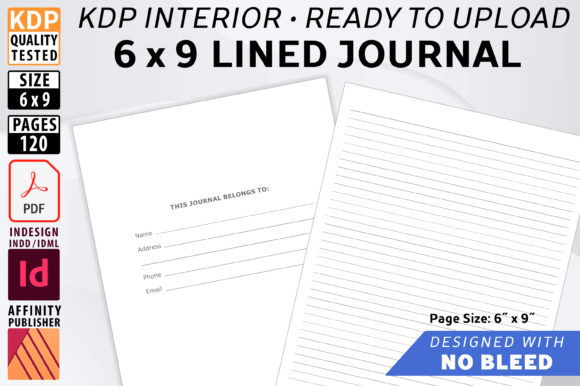
A smooth workflow depends heavily on software compatibility. The 6 x 9 Lined Journal - No Bleed package addresses this by offering multiple file formats, catering to different stages of the design process and different user preferences. The inclusion of high-resolution Print Ready PDF files ensures that the final upload to KDP meets the platform's stringent quality standards. The page size is set at 6.13 x 9.25 inches, which is the required canvas size to allow KDP’s automated trimmer to cut the book down to the final 6 x 9 inch physical size.
For users who wish to customize the layout—perhaps to adjust line spacing, add headers, or modify the "Belongs To" page—the source files are essential. The package includes:
- Affinity Publisher File (.afpub) and Template (.afpubtemplate): Ideal for users working within the Affinity ecosystem, which is known for its cost-effective, one-time purchase model. The template version ensures that your original master file remains untouched, preserving the baseline design for future projects.
- InDesign File (.indd) and Template (.indt): The industry standard for professional layout. Using the .indt file allows you to create a new document based on the journal's styles and master pages without overwriting the original setup.
- IDML File (.idml): This is the backward-compatible interchange format. It allows users with older versions of InDesign (CS4 or later) or Affinity Publisher (1.8 and later) to open and edit the file. This is a crucial asset for long-term archiving and flexibility.
Integration into the Content Creation Process
Using the 6 x 9 Lined Journal effectively requires understanding where it fits in your broader publishing timeline. It is not merely a file to upload; it is a component to be curated.
Phase 1: Preparation and Customization
While the template is ready to upload immediately, the recommendation is to customize it. This is where the "Master Pages" feature mentioned in the file details becomes vital. By editing the master pages in your chosen software, you can globally change elements such as page numbers, footer text, or line weight (currently set at 70 black). For instance, if you are creating a gratitude journal, you might want to change the line color to a soft gray or add a small graphic prompt at the bottom of every fifth page. Because the template uses master pages, you make this change once, and it propagates across all 120 pages, ensuring consistency and saving hours of manual labor.
Phase 2: Quality Control and Testing
Before uploading to Amazon KDP, the workflow should include a rigorous quality control check. The template is noted as "quality tested," but any customization introduces variables. It is advisable to export your customized version as a print-ready PDF and review it in a two-page spread view. This allows you to verify that the lines are straight, the margins are consistent, and the "Belongs To" contact page is correctly positioned. The 120-page count is a strategic choice, balancing production cost with perceived value for the end consumer.
Phase 3: The KDP Upload Process
When you reach the upload stage on Amazon KDP, the interaction with the platform is specific. As noted in the product details, you must select "Bleed" in the KDP manuscript uploader, even though this is a "No Bleed" design. This is a common point of confusion for new publishers. Selecting "Bleed" tells KDP to expect the file size of 6.13 x 9.25. If you select "No Bleed" on the KDP platform, it expects a different file dimension (6 x 9), which would result in scaling errors. Using this template correctly aligns your file with KDP's technical requirements, preventing rejection delays.
Practical Applications and Use Cases
The utility of a standard lined journal extends across various niches. Because the lines "fade into the background" as the journal is filled in, the design supports the user's content rather than competing with it. This makes the interior suitable for:
- Professional Note-Taking: For business owners or marketers who need a dedicated space for meeting notes or strategy sessions.
- Creative Writing: Writers can use the 6 x 9 size as a portable manuscript notebook for drafting ideas.
- Educational Tools: Educators can customize the cover and add specific prompts on the "Belongs To" page to create branded learning journals for students.
- Gift Products: With the holidays approaching, customized lined journals make excellent, low-cost, high-value gifts.
Long-Term Usability and Asset Management
Treat this template as a reusable asset in your digital library. The license allows you to use it as many times as you like. This means you can create a series of journals—perhaps varying only the cover design or a single introductory page—without rebuilding the interior from scratch. By keeping the master .afpub or .indt files organized in your asset management system, you can rapidly deploy new products to market in response to trends or seasonal demands. The ability to scale production without sacrificing quality or spending excessive time on technical setup is the primary value proposition of integrating the 6 x 9 Lined Journal - No Bleed into your self-publishing business model.