Rainy Day Greyscale Line Icon: A Practical Design Toolkit
When building a digital project, visual consistency is often the hardest hurdle to clear. You might have a brilliant idea for a mobile app, a professional presentation, or a website, but sourcing graphics that look good across every screen size and print medium can be frustrating. This is where a specialized asset like the Rainy Day Greyscale Line Icon set comes into play. It is not just a collection of weather-themed drawings; it is a comprehensive design system intended to bring a cohesive, minimalist aesthetic to a wide variety of projects.
Understanding the Collection
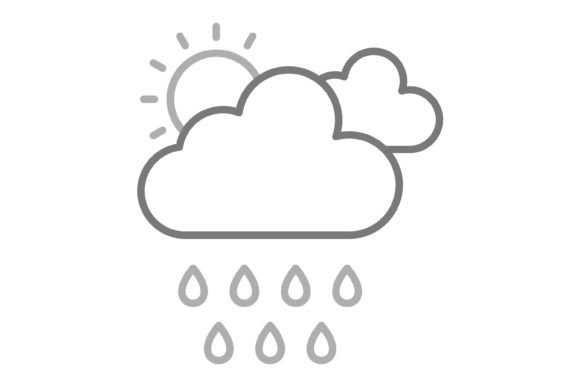
At its core, this package contains 100 vector icons designed around the theme of rainy weather and associated concepts. However, the true value lies in the execution. Because they are line icons, they carry a modern, unobtrusive look that fits well into clean user interfaces or editorial layouts. The "greyscale" aspect is a deliberate design choice. By removing color, these icons act as a neutral foundation. They can be used as-is for a sophisticated, monochromatic look, or they can be easily recolored to match any brand palette without clashing.
The versatility of the asset is defined by the 5 different file formats included in the zip file: AI, EPS, JPG, PNG, and SVG. This breadth of compatibility ensures that whether you are working in Adobe Illustrator, Sketch, Figma, or simple drag-and-drop website builders, you have a file that works natively within your environment.
Who Benefits from This Icon Set?
The utility of the Rainy Day Greyscale Line Icon set extends across a broad spectrum of users. It is rarely the case that one design asset fits everyone perfectly, but the structural decisions made here—specifically the focus on vectors and transparency—make it particularly adaptable.
For the Beginner and Hobbyist
If you are just starting out with design, perhaps creating a personal blog or a school presentation, complexity is your enemy. Beginners often struggle with images that have solid backgrounds (like white squares) that sit awkwardly on colored slides or website headers. This set solves that immediately because every PNG comes with a transparent background. You do not need advanced masking skills; you simply drop the icon onto your canvas. Furthermore, because the icons are designed for maximum usability, they are clear and instantly recognizable, which takes the guesswork out of visual communication.
For Professionals, Agencies, and Freelancers
For a professional web developer or a graphic designer, efficiency is currency. When you are building a dashboard for a logistics company or a weather application, you cannot afford to spend hours drawing basic UI elements from scratch. Having access to 100 vector icons allows you to rapidly prototype layouts. The inclusion of SVG (Scalable Vector Graphics) is particularly critical here. SVGs are code-based, meaning they load faster on websites and scale infinitely without pixelation. A freelancer can use these icons to elevate a client's project, ensuring the assets look sharp on a tiny smartphone screen and a 4K monitor alike.
For Educators and Content Creators
Visual aids are essential in education and content marketing. An educator explaining climate change, or a blogger writing about seasonal fashion, needs imagery that supports their text without distracting from it. The line art style of this set is excellent for this purpose. It suggests the concept of "rain" or "weather" without overwhelming the viewer with realistic details. This allows the audience to focus on the content while the icon serves as a subtle anchor.
Practical Applications and Use Cases
The "Rainy Day" theme is specific, but its application is surprisingly broad. It is not limited to just weather forecasts. Here is how different groups might practically apply these files:
- Mobile App Developers: Use the PNG and SVG formats for UI elements like "Refresh" buttons (using a raindrop) or "Settings" icons. Since they are optimized for mobile, they will not bloat your app's file size.
- Print Designers: For those creating brochures, flyers, or stickers, the AI and EPS formats are essential. These vector files ensure that the lines remain crisp and clean, even when printed on large banners. You can scale them up to the size of a billboard without losing quality.
- Presentation Makers: Whether you are using PowerPoint, Keynote, or Google Slides, the JPG and PNG files are ready to drag and drop. They add a professional polish to corporate reports or creative pitches.
- Template Designers: If you sell website templates or social media kits, these icons serve as excellent placeholder assets that add immediate value to your product.
Evaluating the Asset: What to Look For
When deciding if this icon set meets your needs, it helps to evaluate it against specific priorities like ease of use, flexibility, and long-term value.
Scalability and Editability
A major feature of this set is that it is easy to edit and scale. For users who prioritize customization, the vector formats (AI and EPS) allow you to change stroke weights, alter shapes, or merge icons together. If you need a thicker line to match a bold font, you can adjust it in seconds. This flexibility means the asset grows with your project; you are not locked into a single aesthetic.
Device and Platform Compatibility
The claim that these are ready to use for all devices and platforms is backed by the file variety. If you are a developer prioritizing speed, you will appreciate that SVGs are supported by all modern browsers. If you are a marketer prioritizing presentation, the high-resolution JPGs ensure your social media graphics look sharp. This cross-platform reliability reduces the friction of moving a project from the design phase to the publishing phase.
Cost vs. Value
For entrepreneurs and small business owners, budget is always a factor. Creating 100 custom icons from scratch would cost thousands of dollars and weeks of time. Acquiring a ready-made set that is immediately usable represents a significant saving in both resources. It allows a small business to present a polished, professional image without the overhead of a dedicated design team.
Conclusion
The Rainy Day Greyscale Line Icon set is more than just a collection of weather graphics. It is a functional toolkit designed to solve the common problem of visual consistency across digital and print media. Whether you are a developer needing scalable code, a designer needing editable vectors, or a hobbyist needing transparent PNGs, the inclusion of AI, EPS, JPG, PNG, and SVG formats covers the entire spectrum of modern design needs. By offering 100 vector icons that are easy to edit and universally compatible, this collection provides a reliable foundation for anyone looking to enhance their visual communication. We hope you find this asset as useful and versatile as it was intended to be.